Connected and Protected: The Three Skills Your Child Needs Before Their First App
The 3 Skills Safer That Are Than Any Parental Control App Features
GUIDES
Hui Ying
11/4/20259 min read


What we'll cover in this blog:
Why screen time limits matter more than you think (and it's not what you expect)
The three simple skills that protect kids better than any parental control
How to teach a 3-year-old to question what they see on screens
A realistic approach that works even when you're exhausted
Getting everyone in your child's life on the same page
Can I Be Honest?
I've spent my days and nights working in Trust and Safety, protecting kids online from the worst the internet has to offer. And here's what keeps me up at night: it's not the new apps or the latest algorithm updates. It's that we're handing screens to toddlers without teaching them the skills they need to stay safe.
Parenting is exhausting and sometimes, YouTube Kids is the only way we can make dinner in peace. It is a reality and there’s no judgement here. I am here to share something that changed how I think about protecting kids online: the screen itself isn't the danger. It's sending kids into the digital world without the right skills.
Think of it this way. You wouldn't hand your 3-year-old the car keys before teaching them about roads, traffic lights, and looking both ways. The digital world needs the same approach.
So let's talk about the three levels of protection that actually work, starting long before your child ever opens TikTok or asks for their own phone.
Time Boundaries First (Yes, Really)
Why This Matters More Than You Think
Here's what I learned from watching thousands of online safety cases: the kids who navigate the digital world most safely aren't the ones whose parents installed the best filters. They're the ones who learned self-control early.
Implementing time boundaries isn't about being the screen time police.This is about teaching your child that screens are tools we choose to use, not defaults we fall into.
For toddlers and preschoolers (ages 2 to 6), those early years of unrestricted play, running around, and yes, sometimes being bored, are literally wiring their brains. They're building the foundation for focus, creativity, and emotional regulation. Every minute matters.
Excessive passive screen time during these years doesn't just steal time from development. It interferes with your child's ability to pay attention, solve problems, and manage big feelings later.
What This Actually Looks Like
Establishing screen limits isn't a punishment. It's protection. It's teaching your child their very first lesson about technology, You control it; it doesn't control you.
But here's where most parents struggle. It is the ability to keep it consistent.
A Real Story from Our Community:
Sarah (not her real name), a mom in our Look Up Family community, shared this: "My biggest challenge wasn't setting the limits. It was getting my mother-in-law on board. She would let my son watch two hours of iPad every time she visited, and then I was the bad guy when I said no."
Sound familiar?
Getting Everyone on the Same Page
This is why I say this needs to be a collaborative agreement between everyone who cares for your child. Parents, grandparents, caregivers, everyone.
Here's how to make this work:
Have the conversation - Sit down with everyone involved in your child's care
Explain the why - Share that you're not being strict, you're building skills
Agree on simple rules - Same limits, same approach, every time
Use visual timers - Kids understand a timer they can see better than "five more minutes"
Celebrate the wins - When your child turns off the screen without a meltdown, acknowledge it
Remember: You're not restricting them. You're teaching them a skill that will protect them for life.
When You're Too Tired for This
It's 6 PM. You haven't sat down all day. The dinner isn't made. And your toddler is melting down.
No parent has it all figured out, give yourself permission to be imperfect: Some days, you'll nail the screen time limits. Some days, you'll let it slide. That's being human, not being a bad parent. It’s not about not caring about them. It’s about calming yourself down and choosing what works best for the family.
The goal isn't perfection. It's progress. If you can be consistent most of the time, you're doing great.
Soft Skills Are Your Secret Weapon
Okay, so you've got the time boundaries in place (or you're working on it, which is just as good). Now comes the part that actually protects your kids.
Teaching Them to Think, Not Just Obey
Most online safety resources focus on the dangers. "Don't talk to strangers." "Don't click that link." "Stay away from this app."
But here's what I learned in my years of work in Trust and Safety: fear doesn't protect kids. Critical thinking does.
Instead of trying to control every website they visit or every video they watch, what if we taught our kids to question what they see?
This is about building an internal safety compass that goes with them everywhere.
What Does This Actually Mean for a Preschooler?
I know what you're thinking: "My 4-year-old can barely tie their shoes. How am I supposed to teach them critical thinking?"
Here's the beautiful thing: you're probably already doing it, you just don't realize it.
It's as simple as asking questions:
Source Evaluation (Who made this and why?):
While watching YouTube: "Huh, I wonder who made this video?"
Looking at an ad: "Why do you think they want us to buy this toy?"
Watching a kids' show: "Who do you think decided what happens in this story?"
Contextual Awareness (Is this real or pretend?):
During a commercial: "Do you think that toy really flies like that, or is that just for the video?"
Watching influencers: "That family looks so happy all the time, don't they? I wonder if they ever have bad days like we do?"
Playing a game: "These gems look so shiny and special. But remember, they're not real, they're just pixels on a screen."
Digital Empathy (Real people, real feelings):
Commenting on a video: "If someone left a mean comment on your drawing, how would that feel?"
Sharing photos: "Before we post this picture of your friend, should we ask if they're okay with it?"
Playing online: "That player you're talking to is a real person somewhere. What do you think they're feeling right now?"
Real World Example
I came across a case that perfectly illustrates this change: A 7-year-old recognized a scam because her mom had been asking these questions since she was 4. Someone promised her free Robux if she clicked a link.
Instead of clicking, she thought: "Who is this person? Why would they give me free stuff?" She didn't click. She told her mom.
That's what we're building toward. Kids who think before they click.
Making This a Habit
Here's the secret: You don't need special lessons or worksheets. You just need to make questioning a normal part of screen time.
Try this week:
Pick just one of the three skills (source, context, or empathy)
Ask one question every time your child uses a screen
Notice how they start asking the questions themselves
Parents in our community report that within 2-3 weeks, their kids start asking these questions on their own. "Mommy, who made this video?" "Is this person trying to sell us something?"
That's when you know it's working.
Then (and Only Then) Introduce the Tech
Now we get to the actual devices and apps. But notice: we're getting here last, not first.
Why Order Matters
If you hand a child technology before they have time boundaries and critical thinking skills, you're giving them the keys to the internet without teaching them how to drive.
But if you do the work in Levels 1 and 2 first? Everything changes.
When your child finally gets their first tablet or phone, they arrive as the master of the tool, not its subject.
They already know:
Screens don't control their day (time boundaries)
Not everything they see is true or good for them (critical thinking)
Their actions online affect real people (empathy)
What This Actually Prevents
I've seen too many cases in my Trust and Safety work where kids got into trouble online because they were missing these foundations:
The 9-year-old who spent $500 on in-app purchases because they didn't understand digital money wasn't "free"
The 11-year-old who shared personal information because they didn't question why a "friend" was asking
The 8-year-old who bullied others online because they didn't connect screen names to real people
Every single one of these situations could have been prevented with soft skills first.
The Beautiful Part
When you do this in order (balance, then skills, then platform), something almost magical happens:
Your child becomes more resistant to:
Manipulation by advertisers
Pressure from influencers
Scams and phishing
Inappropriate content
Online predators
Not because you filtered everything (which is impossible anyway), but because you built something better: a child who thinks critically about what they see.
"But, I’m Already Past This Stage"
"My kid already has a tablet. We're already on YouTube. Is it too late?"
No. It's never too late.
You can absolutely go back and fill in the gaps:
If you're already at the stage where you introduce tech(devices everywhere):
Pause and implement time boundaries now
Start asking the questions during screen time
Be honest with your child: "We're going to try something new to help you be safer online"
If you're somewhere in between:
Start where you are
Add one new element each week
Give yourself leeway when it doesn't go perfectly
Remember: Small progress is still progress.
Getting Your Whole Family (and Caregivers) on Board
The biggest challenge parents in our community face isn't the kids. It's getting everyone else on the same page.
Common Scenarios We Hear:
"My parents think I'm being too strict": Share this article. Explain it's not about being strict, it's about building skills. Ask them: "Would you let them cycle without learning how to balance? This is the same thing."
"My partner doesn't see what the big deal is": Invite them to one Look Up Family community discussion. Sometimes hearing from other parents makes it click.
"My child's school requires tablets": This actually makes the fundamentals even MORE important. Talk to the teacher about your approach. Most will support it. Also, check out Digital for Life Resources (https://www.digitalforlife.gov.sg/learn/resources/all-resources/raising-children-in-the-digital-age)
"Everyone else's kids have phones/devices/smartwatch": Every family's timeline is different. You are not everyone else. Parents in Look Up Family are not everyone else. Trust your instincts. The skills matter more than the age.
Your Next Steps (Start Small)
Feeling overwhelmed? That's completely normal. You don't have to implement all of this tomorrow.
If your child is 2-4:
Set up a visual timer for screen time and stick to it for one week
Ask "What is the character doing" during one show each day
If your child is 5-7:
Have a family meeting about screen time limits
Start the "real or pretend?" conversation during ads
Practice asking permission before people can take their photos.
If your child is 8-12:
Discuss the skills together and ask their thoughts
Start teaching them about digital footprints
Talk about the difference between "free" and "you're the product"
The most important thing: Start somewhere. Anywhere.
You Don't Have to Do This Alone
Digital parenting is new for all of us. Our parents didn't have to navigate this. There's no manual. And it's changing every single day.
That's exactly why Look Up Family exists.
We're a community of parents helping each other figure this out in real time. Sharing what actually works (and what doesn't). Asking the hard questions together. Supporting each other without judgment. Staying updated on new platforms and safety concerns.
We meet to discuss age-appropriate screen time boundaries, how to teach critical thinking at different ages, specific safety concerns for new apps, and real strategies from real parents.
Plus, you'll get platform-specific safety guides in plain English, age-by-age activity ideas for building these skills, a judgment-free space to ask anything, and updates when new digital threats emerge.
The Bottom Line
Protecting your kids online isn't about buying the best parental controls or blocking every website. It's not about being the strictest parent or staying totally off screens.
It's about this simple sequence:
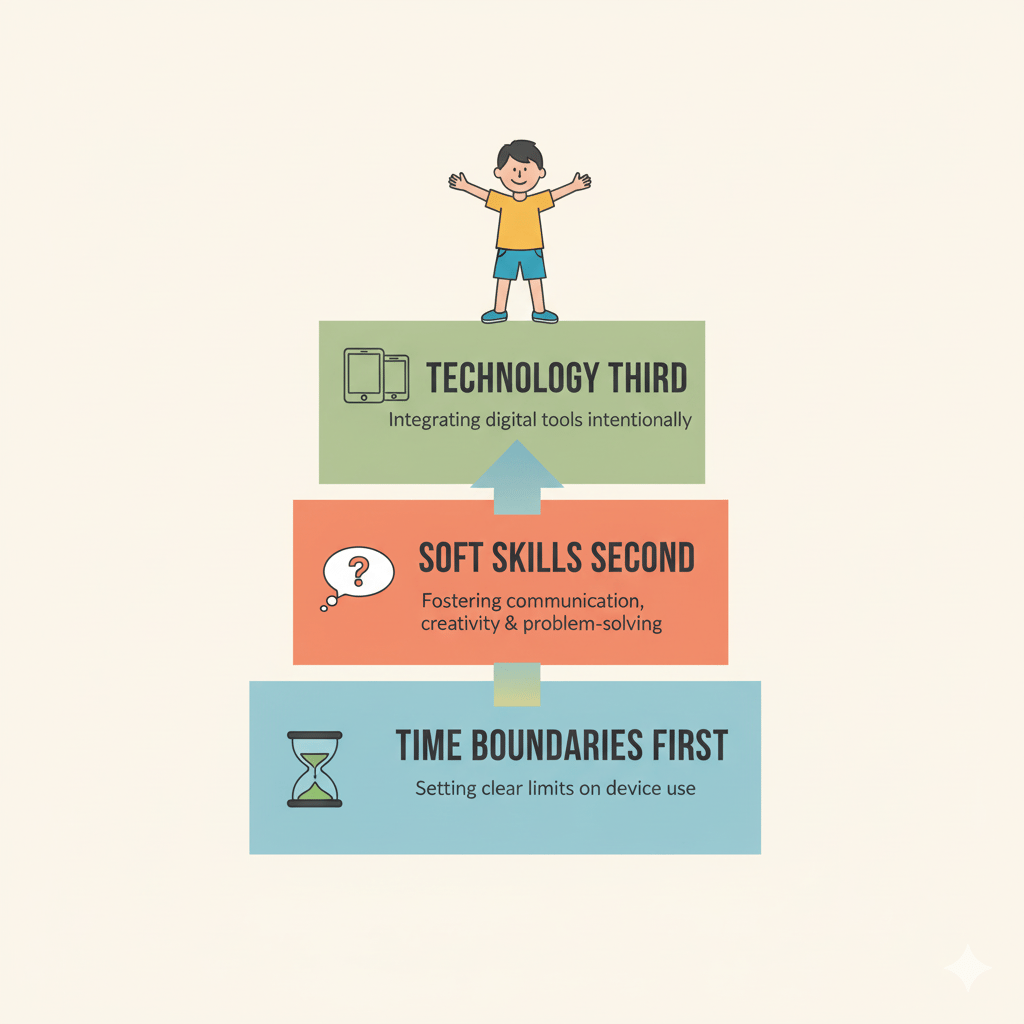
Time boundaries first (they learn screens are tools, not defaults)
Critical thinking second (they learn to question what they see)
Technology third (they're ready to use it safely)
Balance, then skills, then platform.
You're not just filtering the internet. You're building a resilient child prepared for the digital world they're actually going to live in.
And you don't have to figure it out alone.
Join Us
If you're navigating screen time, digital safety, and raising kids in this wild digital world, we'd love to have you in our Look Up Family community.
Whether you're just starting to think about screen time with your toddler, or you're trying to keep up with your tween's latest app obsession, there's a place for you here.
Because here's what I believe: Every family's journey is different. But none of us should have to walk it alone.
Hui Ying is the founder of Look Up Family and a certified Common Sense Media Educator with professional experience in Trust and Safety. She helps parents navigate digital parenting with practical strategies, community support, and zero judgment. Because raising kids in the digital age is hard enough without doing it alone.
One More Thing
After you implement even one of these levels, I'd love to hear how it goes. What worked? What was harder than you expected? What surprised you?
The best insights come from parents in the trenches, trying this stuff in real life.
Email me: connect@lookupfamily.org
Share your story: We feature real parent experiences in our community (with your permission, of course)
Because every time one parent shares what worked, another parent gets the encouragement they need to keep going.
That's what community is all about.
You've got this. And we've got you.